Free internal network monitoring that starts working today.
Install the Xerixos Windows agent, monitor basic site health, and know when gateway, DNS, connectivity, or device checks start failing. Stay free for essential monitoring, then upgrade when you need SNMP, discovery, alerts, or more scale.
No sales call. No credit card for basic monitoring. Upgrade only when your network needs more.
Start free — no credit card for basic monitoring
Free basic monitoring
Essential site health within published plan limits.
Windows agent included
Install once per site and monitor from inside the LAN.
Gateway and DNS checks
See connectivity problems before users call.
Upgrade only when needed
Add SNMP, discovery, and scale on paid tiers.
Cloud uptime tools miss what happens inside your network.
Cloud-only monitors
- Check public endpoints from outside your network
- Limited visibility into gateway, DNS, and LAN issues
- Often miss switch, AP, printer, and internal device problems
Xerixos
- Runs a Windows agent inside the network
- Monitors gateway, DNS, connectivity, and site health locally
- Tracks internal devices and services, not just public uptime
- Adds SNMP and discovery on supported paid tiers
An agent inside your network—not just a cloud ping
Most uptime tools only check public endpoints from outside. Xerixos installs a Windows agent at each site so you can see gateway, DNS, internal devices, and real site health from the local network.
What you get from day one
Four ways Xerixos helps you see problems before users call.
Know when a site is down
Track online, degraded, and offline status from agent heartbeats and failed checks.
Monitor from inside the network
The Windows agent checks gateway, DNS, connectivity, and internal network health from the local LAN.
Watch critical devices
Add switches, access points, servers, printers, firewalls, and other targets using ping, TCP, DNS/HTTP-style checks, or SNMP where supported.
Find blind spots
Use discovery on supported plans to identify devices and promote important hosts into monitored targets.
From signup to site health in minutes
Create an account, install the agent, and see heartbeat and connectivity checks in your dashboard.
Create a free account
No sales call. Start with basic site monitoring in minutes.
Install the Windows agent
The agent enrolls securely and reports health from inside your network.
See site health
Review heartbeats, gateway/DNS checks, alerts, and failed checks in one dashboard.
Upgrade when you need more
Add SNMP, discovery, more devices, and more sites on paid tiers.
See the dashboard in three moments
Fleet health, site detail, and device depth—without wading through every screen.
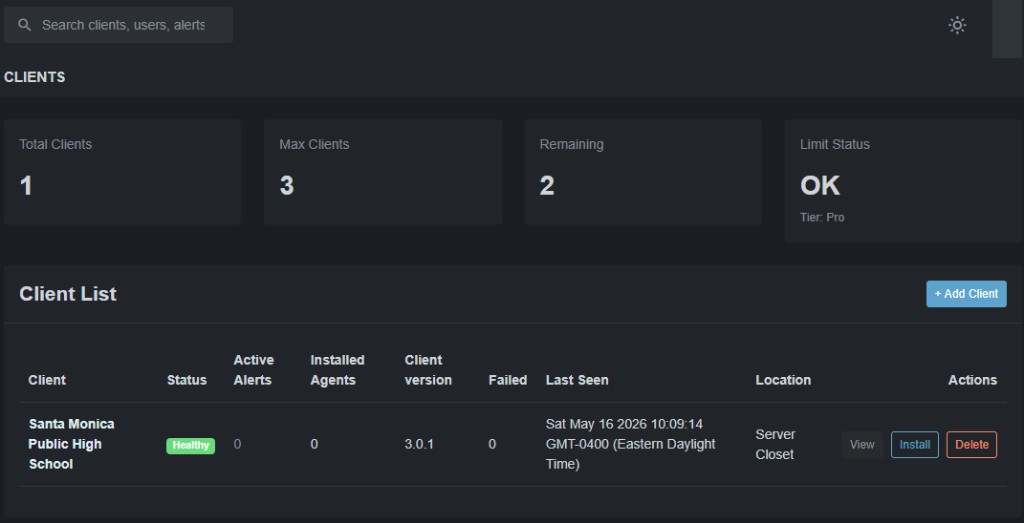
See every site's health in one view.
Manage multiple client sites, agents, and health from one client list.
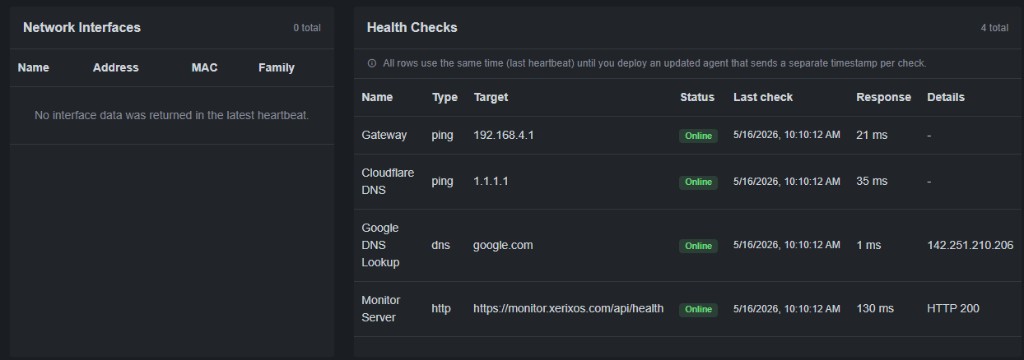
Understand one location's agent, checks, alerts, and monitored devices.
Built-in health checks: gateway ping, DNS, and monitor server reachability from inside the network.
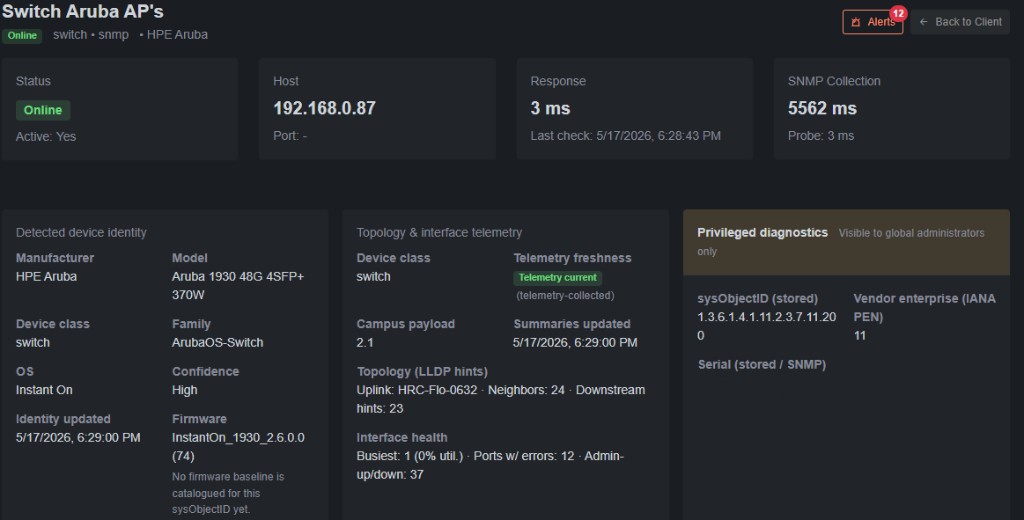
Go deeper when you need device-level monitoring.
SNMP device identity: vendor, model, firmware, interface health, and LLDP hints.
Want discovery, SNMP port maps, and topology? See everything on the Features page.
Start free. Stay free if basic monitoring is enough.
Basic monitoring is free within published plan limits. Upgrade in the monitor app when you need deeper visibility.
Built for teams responsible for real networks
MSPs, internal IT, and multi-site organizations that need visibility from inside the LAN.
IT teams
See site health, failed checks, and device issues before users start calling—without tool overload.
MSPs
Manage multiple client sites, agents, alerts, and limits from one dashboard with room to scale.
Multi-site organizations
Track schools, campuses, branches, and remote sites with consistent internal network visibility.
Common questions
Quick answers about getting started with Xerixos.
Do I need a credit card to start?
No credit card is required to create a free Basic account and install your first agent.
What makes Xerixos different from cloud-only uptime tools?
Xerixos installs a Windows agent inside your network. It can see gateway, DNS, and internal device issues that external-only monitors often miss.
Who is Xerixos for?
MSPs, schools, churches, nonprofits, small businesses, and internal IT teams managing one or many real-world locations.
Can I upgrade later?
Yes. Upgrade from the billing section in the monitor app when you need more sites, devices, SNMP, or discovery.
Start monitoring your first site today.
Create a free account, install the agent, and begin tracking essential network health without a sales call.